Deposits and Withdrawals
All financial operations on CK444 run in BDT. There is no currency conversion and no hidden exchange fees.
Deposit Process
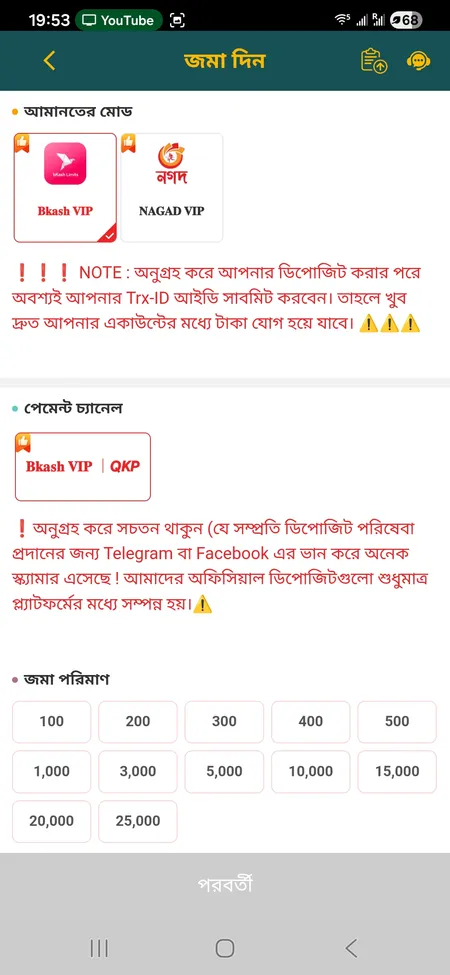
Select 'Deposit' from your account menu. Choose your payment mode - Bkash VIP or Nagad VIP - then pick a specific channel (for example, Bkash VIP | QKP). Transfer the money from your mobile wallet and then enter the Trx-ID (transaction reference number) in the form. Without the correct Trx-ID the deposit will not be credited.
Important rules:
- Only use the official platform interface - never send money via Telegram or Facebook to someone claiming to be CK444
- The amount in your deposit form must exactly match your payment receipt
- Rocket Trx-IDs are 10 digits; bKash Trx-IDs mix letters and numbers (do not confuse zero '0' with letter 'O')
Available deposit amounts: 100, 200, 300, 400, 500, 1,000, 3,000, 5,000, 10,000, 15,000, 20,000 and 25,000 TK.
Withdrawal Process
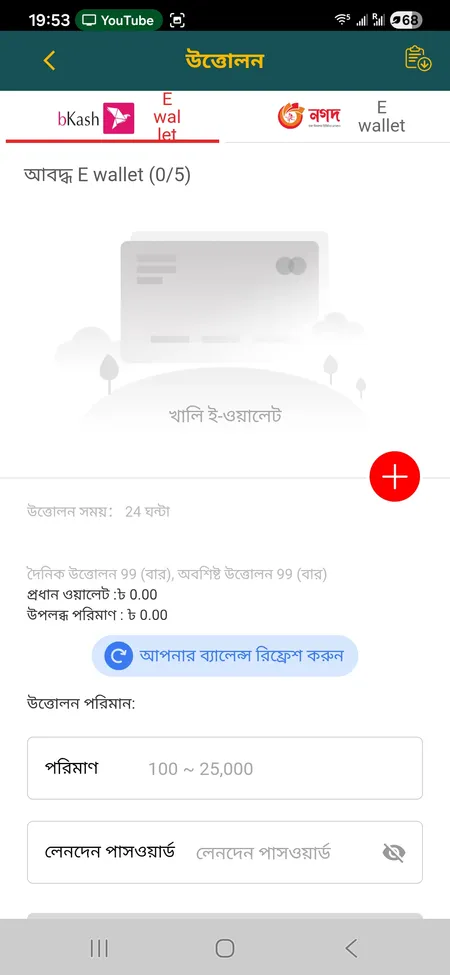
Open 'Withdrawal', choose bKash E-wallet or Nagad E-wallet, select a linked wallet (you can store up to 5), enter the amount (100-25,000 TK) and your transaction password. Processing takes up to 24 hours; the support page quotes 1-5 minutes for most requests. You can refresh your balance with the update button.
| Payment Method |
Type |
Min |
Max |
| bKash |
Mobile wallet |
100 TK |
25,000 TK |
| Nagad |
Mobile wallet |
100 TK |
25,000 TK |
| Rocket |
Mobile wallet |
100 TK |
25,000 TK |
| Upay |
Mobile wallet |
100 TK |
25,000 TK |